Believe it or not, there was a time when Radio Shack was actually a cool place to visit for electronics enthusiasts. These days the shelves are lined with the same crap that put The Sharper Image out of business, but as a kid I remember them carrying some pretty cool robots (Robie Junior joined our family one year), computers (remember the Tandy?) and electronic components that were actually useful. Those days are long gone but thankfully there’s a much better alternative where I live. Active Surplus is the kind of place that attracts a wide range of people from geeks to hackers to artists, and it’s mostly due to their eclectic stock of merchandise.
There’s kind of an ‘anything goes’ mentality at Active and you can find everything from empty Lacie drive cases, to chemistry glassware, to any kind of computer, audio or video cable you can imagine. And more importantly, most of the stuff is dirt cheap. The staff is also very knowledgeable (one thing Radio Shack never had) and while they don’t tend to roam the store (the aisles are pretty narrow) they’re always ready to help you find what you need. After the jump you’ll find a few more pictures I took during my most recent visit.
Thanks to dropping prices and increased availability, green laser pointers are becoming more and more common. As a result you no longer feel like a member of the ‘tech-elite’ when you pull one out. So the only solution to that problem is to upgrade to a blue laser pointer. Unfortunately if you decide to pick one up from Wicked Lasers you’ll be spending almost $1,700. Sure that price will eventually drop, but if you must have one right now here’s a brief tutorial by Joey Hagedorn on building your own that’s surprisingly cost-effective.
The key to this project is finding a Sony KES-400a replacement Blu-Ray drive module for the PlayStation 3 console. Thankfully there seems to be a few available on eBay right now, ranging in price from just $39.99 up to around $54.99. Of course there are other items you’ll need like a housing, a PCB breadboard and even a 650nm 5mw 12X30mm laser module, but overall you will save quite a bit of money by building it yourself. While the homebrew laser’s performance might not be as impressive as the version Wicked Lasers sells, it still produces a bright blue dot that can cause eye strain, and the beam is actually visible in a dark room.
When his Casio CFX-400 scientific calculator watch broke after 10 years of day-to-day use, David Jones went looking for a replacement. Unfortunately similar watches on the market today just didn’t cut it, mostly because they only include basic 4 function calculators. So instead of resorting to carrying a full-sized calculator wherever he went, he decided to try and make his own. After finding a 53mm x 20mm compact 2 line LCD display that seemed to fit his wrist, he spent about 30 hours building the first prototype using only off-the-shelf components. The version pictured above is actually the second prototype, and while it might look a little rough without a case, it’s actually more impressive since you realize it’s not a commercially available watch.
For those hoping to make their own calculator watch, there’s a Design & Construction section on David’s website which will hopefully one day include a thorough tutorial on how he put it together. And for the electronically inept, there’s a Get One! section, which is also unfortunately empty at the moment.
Without a big fat defense contract from the government, how is the average consumer supposed to go about creating their own wise-cracking, sequel-spawning, remake-coming robot sidekick? Since Heathkit never sold a complete Johnny 5 kit, you’ll have to slowly piece together your own. And you can start with this robotic arm available from RED5 for about $60.
While it comes partly disassembled (oh no!) you can put it together without having to do any soldering or wiring. It’s powered by 5 electric motors that allow it to lift a whopping 100g and the arm features a 120 degree wrist pivot, a 300 degree elbow motion and a 180 degree base motion. And if I remember correctly, if you want it to develop some level of sentient intelligence, you’ll need to use it outside during a storm and hope for the best. Just be aware that a lightning strike doesn’t always guarantee it will develop a soul. It sure hasn’t worked for me.
I suppose that part of the ‘tough’ image associated with tattoos is having to go through the tattooing process itself. But we at OhGizmo! are all for any solution that skips the pain part of getting ink done. That’s why this inkjet tattoo paper is so awesome. Not only is it painless, but it allows you to turn any design or image on your PC into a temporary piece of body art.
Actually creating your own tattoo design is probably the hardest part. Once it’s printed you just need to apply an adhesive sheet to the printout and smooth out any bubbles. When you remove the adhesive sheet, the printed tattoo will be left with a sticky surface allowing it to be applied to your skin with a wet sponge. The tattoos are water-based and non-toxic, so while they’ll stick around for about a week if you avoid bathing or showering, they can easily be removed with just soap and water.
A single A4 sized sheet of Inkjet Tattoo Paper is available from Crafty Computer Paper for about $5, while a 5 pack is about $25. So there’s no real savings for buying in bulk.
Someone with the alias of ‘Klee’ has posted a brief guide on the VWvortex Forums of how to use the Wiimote’s built in 3-axis accelerometers to measure g-forces and calculate the 0-60 performance of your car.
So I did. I wrote a script to dump all the g-force readings from the wiimote to a comma separated value file, then did some post processing in MS Excel, and voila, I can see every bump, every curve, my acceleration and braking, and even calculated my current speed using high school physics (v=a*t)
I admit, it’s not super accurate since the wiimote spits out G readings rounded to two decimal places. It also provides other acceleration readings in finer granularity, but I couldn’t figure out what metric it was recording in. I used Gs since I knew it was just the acceleration of gravity (9.8 m/s/s).
Besides the Wiimote itself, all you need is a copy of Glovepie v0.29(or higher) and a bluetooth dongle with the BlueSoleil human interface drivers. Klee has also provided the Excel spreadsheet document he created, complete with formulas and graphs for crunching and interpreting the numbers.
What better way to celebrate St. Patrick’s Day than with a creation by Ireland’s most famous inventor? (Who cares if Thomas Edison was actually Dutch? On March 17th everybody’s a little bit Irish.) This build-it-yourself phonograph kit comes with everything you’ll need to recreate Edison’s waxed pipe experiment, except that since waxed pipes have gone the way of HD-DVD, it uses plastic cups to record your message.
The only thing you’ll need to provide are a Philips’ head screwdriver, some scotch tape, scissors and a D-cell battery to power the motor. And by recording your own music you’ll never have to worry about the RIAA busting down your door, unless of course you start transferring your CD collection to plastic cups, as I’m sure that doesn’t fall under fair use rules.
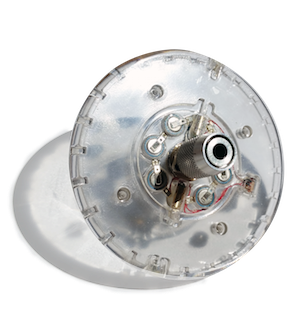
Like many of you, I used to make pots. Back when I was in elementary school. Back when getting dirty was the best thing ever, and “art” was something you did when your parents wanted rid of you for an hour or two. To their credit, my parents still have some of my misshapen failures on display back at home, but I’ve grown out of it. This video kinda made me think it might be fun to make one of these DIY USB pottery wheels and give it another shot, since a spinning platter full of wet mud is exactly what I want right next to my USB ports. Now all I need is a USB kiln…
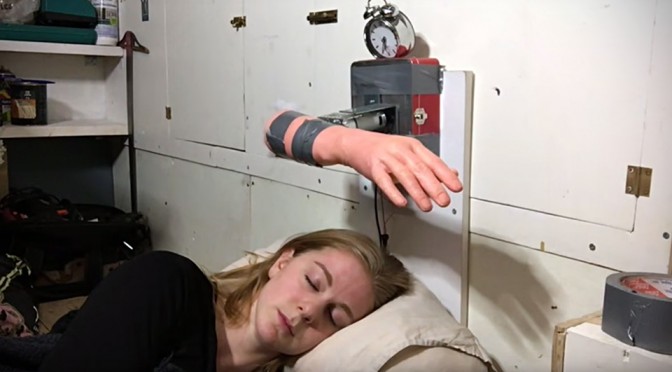
It’s a well-known fact that I like naps. It’s also a well known fact that I hate waking up from naps. We’ve seen clocks that shake you, hide from you, or even electrocute you, but I feel confident that my brain would not be required to defeat any of those. The Turing alarm clock was designed to require the owner to prove awakeness by answering a series of math questions. It’s too bad I can’t do math in my head even while fully conscious, but come to think of it, it would be pretty cool if you could program this clock with other questions as well… Say you need to study for a bio test; just program the clock to not shut off until you answer a series of bio questions correctly. If, like me, you’ll do anything to shut the damn thing off, you’re guaranteed to learn whatever it takes to answer those stupid questions and get back to sleep.
I know Hasbro released an ‘Ultimate Lightsaber’ kit that allowed you to mix and match pieces and build your own custom lightsaber, but it was made of plastic and just didn’t have the appeal of the Force FX series from Master Replicas. So I was pretty surprised to discover that MR actually has a similar kit for building your own custom Force FX saber.
The kit includes 3 pommels, 3 handles, 3 center bands, 3 front bodies, 3 emitters and a tri-color blade capable of switching between red, green and blue. While all those components give you over 1000 possible combinations, the downside is that the blade is only illuminated by a single LED, which means you won’t get the nifty ‘rising out of the hilt’ effect when you power it on. However it still has all the motion activated sound effects, and since all the pieces are machined from metal, the final product will look a lot cooler than what you could build with the Hasbro set.
Just keep in mind that the Master Replicas’ Star Wars license has expired, meaning the Force FX Lightsaber kit is only available in limited quantities. So if you consider yourself a real fan, you’d better head over to Amazon where you can find one for $99.99.